
One nice option you have in Excel is the ability to drag series values down, saving you the time of entering individual values for well-known lists. Here are a few data types you can drag to auto increment:
- numbers
- years
- months
- day of week
- date
- time
To take advantage of this shortcut, just add your first value, then click-and-drag the bottom-right corner of the cell as far as you need values filled in. Alternatively, if you’re working with a table of data, you can double-click on the bottom-right corner, and Excel will fill values to the row of the previous columns.
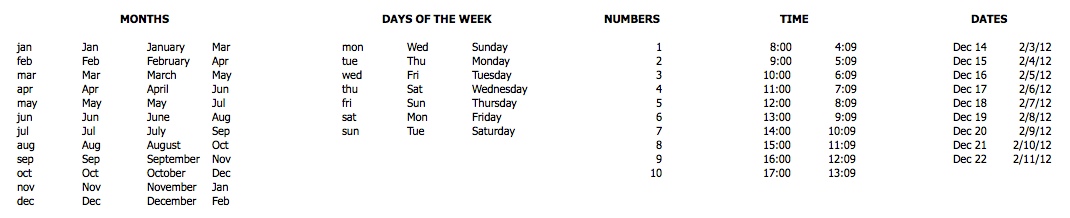
Another alternative is to create your own lists that you can later use to auto increment, such as student names, list of products, sales regions, members of a group, etc.
After you get comfortable with dragging lists that Excel provides baked in, you can start your own custom list in 2010 or 2011.
Learn More
You can learn more about data formatting in my Annielytics Dashboard Course, a video course that will teach you how to put your data in stilettos and work the pole. 🙂
Hi Annie,
Love the look and flavor of your new blog. Fun! Okay, I am a total Excel moron, but thanks to you I now can make my spreadsheets look fabulous!. I am struggling with something that maybe only pertains to this post because It concerns an exported report from SEOMoz that shows Domain Authority, my clients versus competitors, historically by month.
I can’t figure out how to use the data in the exported .csv to recreate the lovely graphs SEOMoz shows on the Historical Link Analysis page (and of course this is the one place where they don’t offer a .pdf export ). I could just use a screenshot, but I can’t “play” with that 😉
Can you point me in the right direction? Thanks!
Dana
@danatanseo (same username at SEOMoz)
Hey Dana,
I’m working on a tutorial for you but decided to give SEOmoz first right of refusal, if they want to publish the post. Either way, you’ll have a tutorial soon. 🙂
Hi Dana,
Here you go: http://www.seomoz.org/blog/guide-to-replicating-seomozs-graphs-in-excel#jtc207027. Just for you. 🙂