
As I promised in my last video, in this video I take the bar chart and transform it into a sexy, double-sided bar charta la …
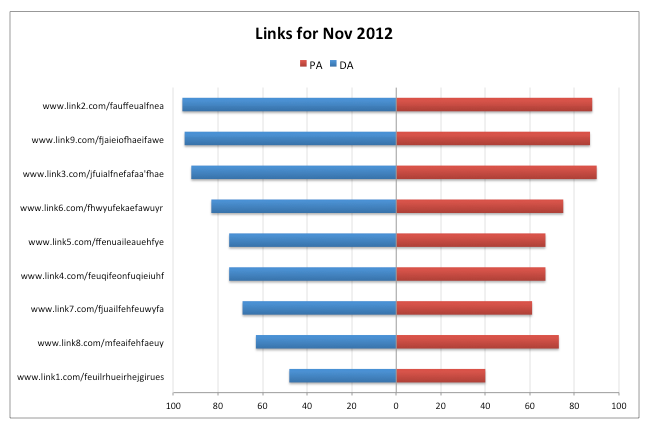
#ooolalaaa
I first tried one of these with Tori Cushing, when we were charting out tweets vs. Facebook likes for a client, and it was love at first sight.
It’s a great option when you have two values with long labels you want to chart out. Or if you just want to show off. 🙂
Although I captured the video while working on a Mac (because the video quality on the work PC I brought home was crapola), I provide instructions for each step for both Mac and PC. It’s seven minutes.
Final Cleanup Tip
I didn’t include this in the video because Excel for Mac makes this so ridiculously difficult. But if you have any hints of OCD, it might bug you that the legend has PA on the left, while it’s to the right on the chart. If you didn’t notice that, you’re probably hating me for pointing it out. And I’m good with that. 🙂
Fixing The Legend on a PC
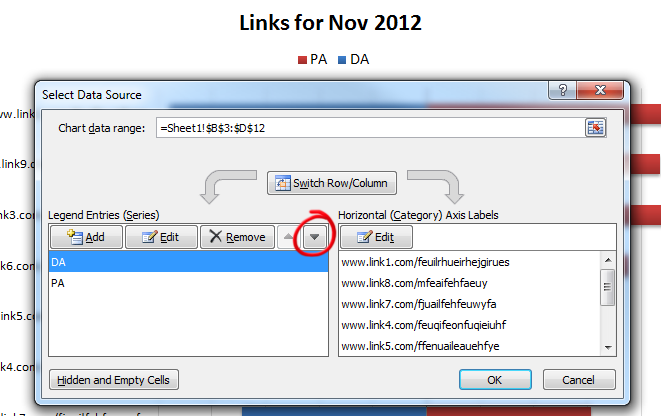
To fix it on a PC is easy peezy. Just right-click on the legend, choose Select Data, select DA under Legend Entries (Series), and click the down-facing arrow. You’ll see the legend update immediately.
Annnd On A Mac (Lame Alert)
To fix it on a Mac, follow the steps in this two-minute video. (It may help decrypt the scary Data Source menu anyway.)
Download The Excel File
You can download the Excel doc I worked from, if you want to poke at it a bit and take a peek under the hood.
Learn More
For more beastly data visualization tips and tricks, check out out my Annielytics Dashboard Course offerings.
Thanks for the video. I always wondered how to present the PA and DA in Excel as double-sided bar chart just as in Seomoz 🙂
Oh do they? I didn’t even know that. Serendipity at its finest. 🙂
Hi Annie, thanks for your wonderful blog.
With the new excel 2013, it is not enough to change format of cells, you also need to format axis, exactly the same way: axis options > number > category > custom.
Yeah, I just ran into that last week. I wonder if it’s a bug.
Just what I needed to know. Thanks for the tutorial.
My pleasure!
I don’t suppose there is a way to implement a different scale for negative values than what is in place for positive values, is there? My data on one side has a different range of values than on the other. Converting to a percentage won’t convey the right information here.
Great tutorial either way!
I’ve never tried it, but I imagine it would work. I’m picturing a combination chart a la http://searchengineland.com/dashboard-series-creating-combination-charts-in-excel-163529 with negative values applied to the smaller of the two values. YMMV
Thanks for such a useful information.