
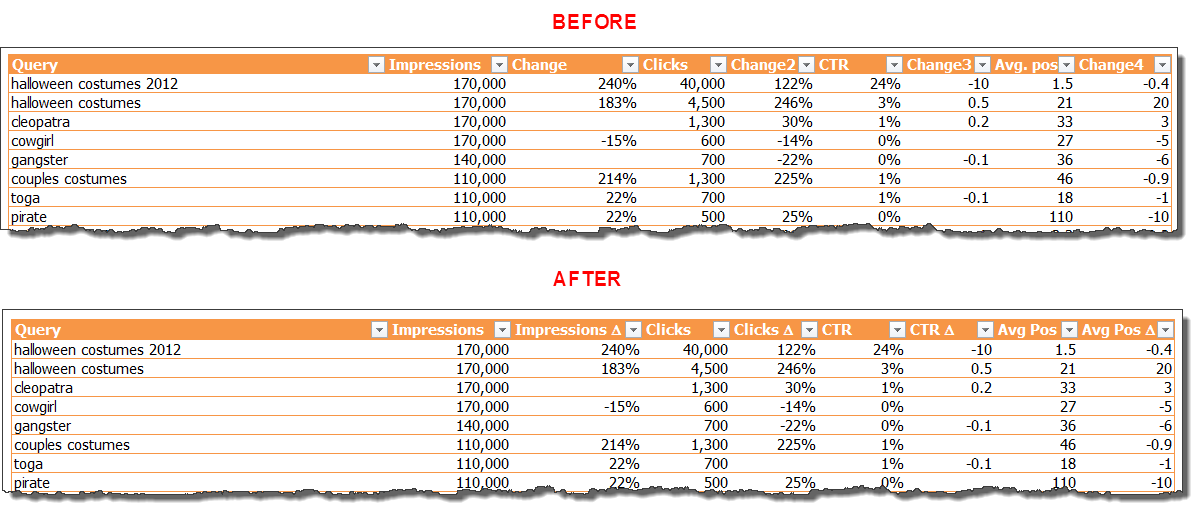
When I’m working with tables or charts, I like to make labels as short as possible. So when I’m showing a change in a metric over time, like percent difference, I’ll use the delta symbol (Δ) instead of writing out “change” or “difference.”
To do this, just type a capital D (I think of d for delta), select it, then change the font to Symbol. Voila! You have a delta character.
Note: If you’re using a formatted table — and you should almost always format your data as a table — the delta may mess up your heading formatting. In the example below, it made the white font black. If it does, nbd … Just reformat it to match.
I use this when I’m formatting the Search Queries report in Google Webmaster Tools (under Traffic). Here’s what it looks like before and after:
Learn More
You can learn more about data formatting in my Annielytics Dashboard Course, a 16-hour video course that will teach you how to put your data in stilettos and work the pole. 🙂
~~~
If you would like to learn more about Excel, check out my Excel dashboard course. 24 instructional videos, totaling 6+ hours of instruction for $95.

Hi Annie,
If your PC is set up to accept Unicode ALT codes you can also type ALT+0394 to give you the Δ
I explain how to do this here https://www.myonlinetraininghub.com/alt-codes-symbols-characters
Cheers
Phil
Nice, Phil! Thanks! Tell Mynda I said hi! ?♀️
Cheers, will do 🙂