The title of this post is falls short a bit because, as ubiquitous as Google is, their algorithm updates aren’t the only events that may affect your site’s performance in the search engines.
My SEO Calendar GCal
Anyway, to keep abreast of these changes, I created a Google Calendar in 2010 to help me monitor them. It’s especially nice when I’m in a client meeting and they say something like, “Our traffic took a bloody nosedive in June. Were we hit by Penguin?” (You may want to check this post by Danny Sullivan out if you think penguins are just cute little animals in tuxedos.) It’s really helpful for me to just pull up my calendar and see if their digital D Day correlates with any major updates.
Access Options
You can view the calendar below or choose from one of the following viewing options:
How To Add This Calendar To Your GCal
If you’re using a Google Calendar, here are the steps to add this calendar to it:
Step 1: Click on the iCal link. It’s going to automatically download a file, basic.ics.
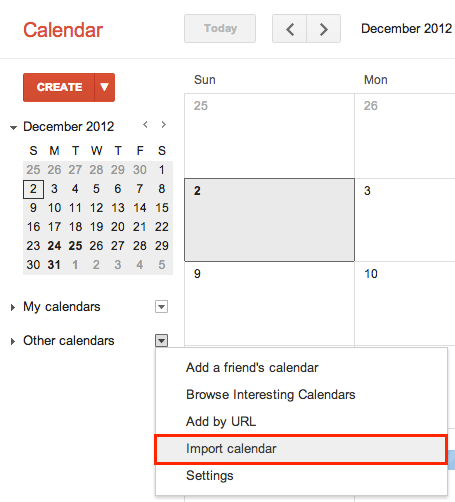
Step 2: In your GCal, select Other calendars > Import calendar.
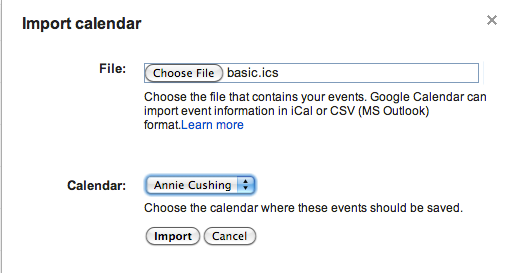
Step 3: Click the Choose File button and navigate to the basic.ics file you just downloaded, then click the Import button. It will now show up under My Calendar.
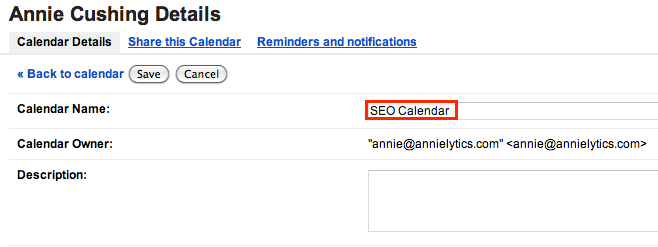
Step 4: For some reason, Google brings it in with my name instead of the calendar title, which is SEO Calendar. So dumb. To change that, hover over the calendar name, then click on the down-facing arrow that appears onhover and choose Calendar settings. Change the Calendar Name and click Save.
Step 5: Choose Month from the tabs in the upper-right corner of the calendar to view an entire month at a time.
Other Resources
SEOmoz has a great Google Algorithm Change History resource that tracks updates that date back to 2000, and they’re better at keeping theirs updated. (However, not offering it as a calendar makes it slightly less accessible, imo.) Barry Schwartz also has a blog category of Google updates you could peruse.
UPDATE
One of my awesome commenters, Paul Gailey, pointed out that if you click on the teeny-tiny Google Calendar image in the bottom-right corner of any embedded gcal while you’re logged in to your Google account, you’ll get a prompt asking you if you want to add the calendar. Very convenient! Thanks, Paul!
i like that Annie.
I do always think we under-use calendars among each other. Here’s the Mozscape updates into your calendar with 1 click: http://mmkt.in/SEOMozGoogleCalendar I’d love to see a Mozcast one created (heh, a forecast would be cool 😉
Very cool! How did you get the shareable link to be able to so easily add the calendar?
Every Google calendar offers that link to add it to calendar, it’s just not so obviously placed or branded as it’s the old style Google branded image link. As SEOmoz publish the embedded calendar I just right click bitlyfied it.
SEOmoz offers a calendar? Can you send me a link to where they offer it on their site? Maybe then I’ll be able to figure out what you right-clicked b/c I still have no idea what old-style image you’re talking about.
here you go, there’s one on this very page!
http://markup.io/v/4jdcpdzrfm3f how meta is that? image also pasted here – heh
Okay, what exactly do I click from the contextual menu? I’m not seeing anything but image options, but I might just be obtuse. O.o http://www.screencast.com/t/0IeDuRQso
ok, my bad from memory on the explanation. if you deconstruct my custom bit.ly you can see the syntax. so mmkt.in/SEOMozGoogleCalendar+ shows the original link that it shortens, which follows the syntax of https://www.google.com/calendar/render?cid=linkscapecal@gmail.com which when you are gmail logged in will modal prompt you confirmation to add the calendar to your own calendar(s). If you click the +Google Calendar image link, it does behave that way but you are correct that right clicking it is all Grr! So you basically have to inspect the address URL that results from clicking it. Yeah?
Ahhh! I get it now. Check out the update. 🙂
There seems to have been an update in the UK this Monday just gone.
Suddenly all the sites with loads of directory links seem to be ranking very well indeed!
There may have been an update, but it wouldn’t have been crafted to reward directory links, something Goog hates.
Great resources! I was thinking about this though “It’s really helpful for me to just pull up my calendar and see if their digital D Day correlates with any major updates.” I’m a Social guy not an SEO guy so forgive the probably stupid question. How long after a update launch date would you consider it was probably that which hit them? Updates roll out rather than hitting everyone on launch date right?
Yes, you’re absolutely right. This year Google announced that its updates would roll out over a period of time. I try to capture the date webmasters first start crying foul. If you haven’t used it, Chartelligence is an awesome Chrome extension that overlays updates over your GA data on the timeline. Really cool.
Awesome share Annie, it’s a great idea to put those updates in a calendar, I usually just keep a record of algo updates in a spreadsheet, but this is way cooler! using this calendar and Mozcast together will be awesome when consulting with clients
Yeah, having updates in a calendar is really convenient. Glad you’ll benefit from it.