
If your site has subdomains, there’s a filter that’s absolutely critical in Google Analytics (GA). It’s called a hostname filter.
The Problem
GA content reports only include the URI (which is just a URL minus the domain). So my homepage looks like / instead of www.annielytics.com/. And my About page looks like /about/ instead of www.annielytics.com/about/.
Normally, that’s not a problem. But imagine if you have a site with multiple subdomains, like www.yourdomain.com/, blog.yourdomain.com/, store.youdomain.com/, reviews.yourdomain.com/, etc.
The Ensuing Chaos
There are two primary points of chaos caused by unfiltered reports:
- Think about it. What would the homepage of each of those subdomains look like? You guessed it: /. So analyzing the homepage of those homepages individually is impossible because they’re all going to blend together.
- You can’t create advanced segments based on subdomains to compare their performance.
Yeah, basically you’re hosed.
How To Fix It
Okay, so let’s get on with fixing it, shall we?
- Click Admin in the upper-right corner of GA.
- Click the view you want to add the filter to.
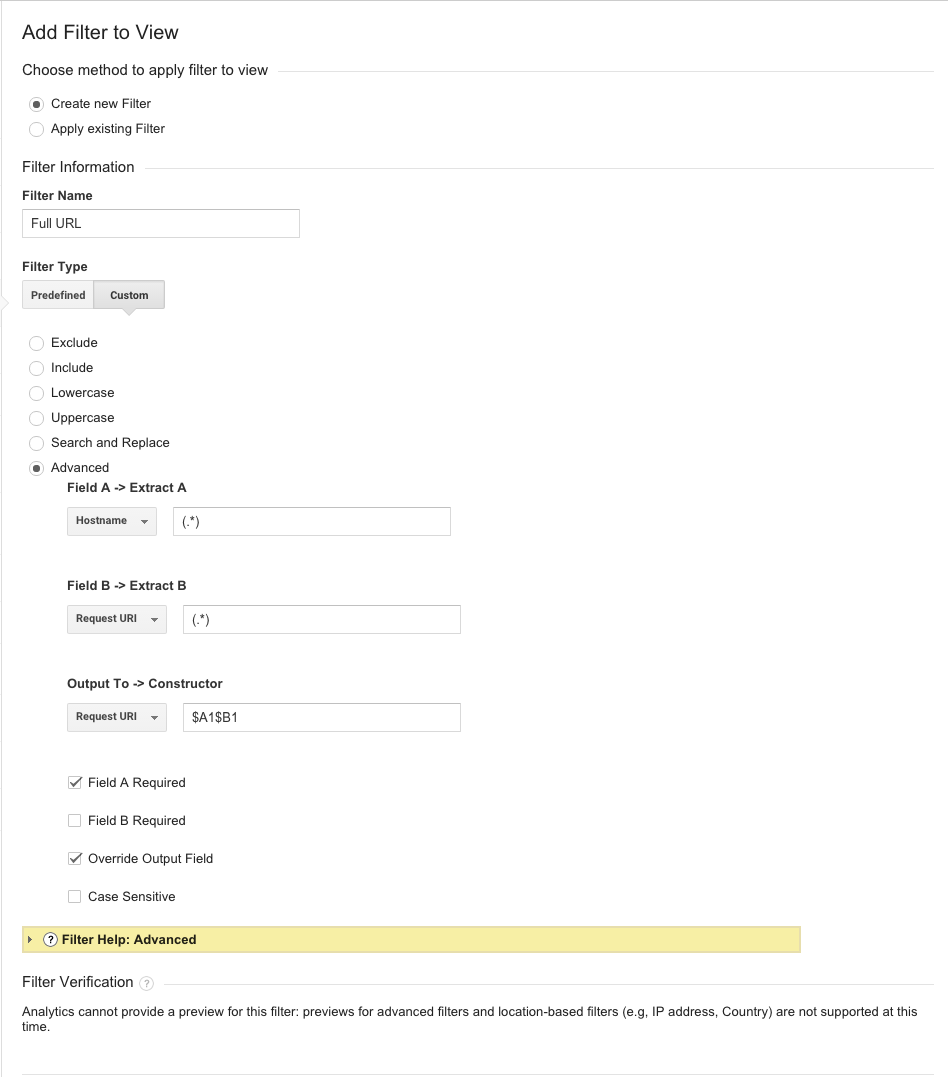
Follow the instructions in the screenshot below.
Caveat
When you add this filter it’s going to wreak havoc with your reports. So I always recommend making this switch on the first day of the month, so it doesn’t jack up your monthly reports. If you need to merge rows, you’ll need to use a macro or pivot table.
Learn More
If you want to learn more about filters in Google Analytics, check out my Analtyics Audit Template, a self-guided, 147-page audit template that is regularly updated and will teach you how to do detailed analytics audits like a pro.
Great tip, thank you! Are there any immediate ways to know it’s working?
Thanks! Depending on traffic to your site, you should be able to start seeing full URLs in any content report within a few hours. I would take these steps to check:
1. Change the date to today only.
2. Go to Content > Site Content > All Pages.
3. Enter your subdomain in the line item filter (http://www.screencast.com/t/gYUvoDesD).
Just did this last week and it’s helping out big time!
Related question:Have you ever come across a profile filter that will strip out visits to the domain, but combine all the subdomains? I’m trying to avoid setting up multiple profiles for each subdomain. I want a view of all the subdomains combined together, but exclude any visits to just domain.com. My full explanation of what I want to do can be found in this Google Analytics forum post:http://productforums.google.com/d/topic/analytics/DHtCcJainso/discussion
Hmm … Yes, I’m sure it’s possible. I’ll need some time to tinker w/ it.
Thanks Annie. Much appreciated.
Annie – I have a site with www. and forum. as separate subdomains. But I’m using different GA codes on each, so I assume this doesn’t apply, correct?
ps – focus!
Ohh good point! I’m going to add an update w/ a clarification.
As to your question, no, it wouldn’t. However, unless it’s a really large site, using different profiles for subdomains is usually suboptimal. This is b/c when someone passes from one subdomain to the other, the browser suffers the dropsies with the cookie. So if someone lands on the www subdomain from Twitter, for ex, and then navigates to the forum, your www subdomain becomes the referring site, not Twitter.
You can remedy this with cross-domain tracking though. Do you have that set up?
Now let’s see … What was I doing before I got distracted with this comment …? 😛
I don’t know if we have cross-domain tracking setup. I’ll have to check. I can find that in the “grab the code” section, right? Or is that just where we’d grab new code if we don’t have it setup? (It’s just a hobby site, so not really a big deal, but this is good to learn about.)
I know Yoast has a WordPress plugin that adds it automatically, but it doesn’t look like the site is running on WP. I also saw this: http://www.lunametrics.com/blog/2011/12/01/automatic-cross-domain-tracking-revisited/. Otherwise, you just need to add a script to any link or form that points from one subdomain to the other. If you only have a few links it’s nbd to add. If you have a lot you would need an automated script … or a cheap intern. 🙂
But you need to update your GATC to the asynchronous one and get it in the . You’re missing a lot of data. If you need help generating it, I can do it for you in a few mins. Or you can go to Admin > and turn on “Multiple top-level domains of annielytics” and whatever else you need.
Hi Annie, thanks for another useful post. I’ve no problem doing this but tried recently, as part of a Roll up project, to add a filter after this one to rename the hostname but it doesn’t seem to take. Any ideas? I want to rename it because the ‘hostname’ is the domain’s IP address and this obviously looks bad in reports. Was trying to rename it to something more intuitive. Many thanks for your time!
Hi Peter,
Did you set it up this way (screenshot: http://screencast.com/t/2EuhhxhK2R)? Obviously, you would need to replace the example IP with the one showing up in your reports. You also have to make sure it comes after the filter that adds the hostname to your URLs.
Hi Annie,
Thanks for the reply and going to the trouble of a screenshot! I certainly had it after the hostname filter and I think I set it up exactly as you suggested. In any case turns out the developer changed the site so that it shows a proper url rather than the IP now so problem has gone and solved itself. Still curious what went wrong though … Anyway thanks again
Yeah, then there was some other funky monkey reason it wasn’t showing up, like maybe it wasn’t a dedication IP … or something.
hi Annie, Great Post! I have implemented the same filter to show my full Domain Name. But whenever I want to visit that link, its a problem. the url being fetched will be repeated twice. by that I mean, upon clicking the small symbol to open the url in a new tab/page, the url is: http://www.mydomain.comblog.mydomain.com. Please suggest Y this might be happening? I appreciate your time and effort. Thanks!
Yes, this is a bug in Google Analytics. Google Analytics adds the hostname to create clickable URLs. It wouldn’t be too hard for them to include logic that checks for the presence of the hostname in a filter and alter its code, but that hasn’t happened to date.
Thanks for the reply. Keep up the great posts… really helpful.
Hi Annie!
Do you know if this bug has been corrected by Analytics? i just applied the filter but the clickable url has the host twice.
Thanks!
The bug hasn’t been fixed, and I kind of doubt it will be. But if you’re seeing the hostname twice, that’s most like a filter or setting issue. For starters, make sure there’s nothing in this field in your View Settings area: https://www.screencast.com/t/KsYRUXiP. I talk about how this is the worst setting in GA here: https://annielytics.com/blog/analytics/worst-setting-google-analytics-video/.
Hi Annie,
Great post! I have a hostname addition I’d like to make with a slight twist and am looking for some advice….
A section of our site is turning into a subdomain. Since that section of the site has historically brought in traffic within our main Analytics profile, I want to continue to track it there. The issue is I don’t want to wreak havoc on past data, as there are many people who use this account and external pivot roll-ups/lookups in Excel aren’t in everyone’s skill set. My proposed solution is to only add the hostname for the new subdomain so the main site’s data continues to come in with URIs and the new subdomain will come in with the whole URL. Based on that, I have two questions for you:
1. Can you think of any potential issues this may cause?
2. Any idea how I can get that advanced filter to work? Using your example screenshot, I’m thinking if I have the (Field A -> Extract A Hostname = subdomain.mysite.com), it should only pick up and replace pages coming in from that specific hostname with the full URL and leave the http://www.mysite.com pages coming in with just the URI. I’m not very familiar with the advanced filtering and need some guidance 🙂
Thanks!
Erin Simmons
Fascinating test, Erin! I don’t anticipate any problems. You shouldn’t even need regex. If you just go to the Hostname report (Audience > Technology > Network > change primary dimension to Hostname), you can match it exactly. I’d love to hear how it turns out!
This test was successful! The only issue I found was that the fields are always RegEx sensitive. So if you’re typing in a subdomain as the hostname, you have to make sure to escape the “.” For example: (subdomain.domain.com)
Ah yes, of course. That makes sense. Thanks for reporting back, Erin!
Ohh.. so here’s an interesting problem. I’ve added the filter as you’ve defined it to a new profile that is tracking across 3 subdomains (a main site, a blog, and a Hubspot landing page domain). I’m seeing the full domains in the reports. Hooray (blog was previously on a different property/ua code, and Hubspot landings weren’t even being captured)
I’ve created segments filtered by hostname for each of the 3 subdomains so I can easily look at one report and see how each domain is contributing to our overall traffic.
The problem… my segment for blog._____.com, even when it’s the only segment in place, I’m seeing www. based URLs in the Site Content: All Pages report. 🙁 Any thoughts?
Oh… and one note. In my segments, I have it set up to exactly match that segment’s URL with extra conditions where hostname ‘does not contain’ the other two subdomains.
Obviously I can do a report filter to get out the bad records, but I was hoping that the segments would let me avoid having to do that.
Also interesting to note. The blog segment is reporting on the blog. and the www. subdomains, but not the info. landing page subdomain. The landing page segment is pulling the info. and the www. but not the blog. subdomained pages.
Great question, Todd. You’re seeing other subdomains in the All Pages report because in a single session someone can move easily from subdomain to subdomain. If you want to restrict your segments to a single subdomain, you should use the Landing Pages report. The landing page dimension is a session-level dimension, as opposed to a hit-level dimension like page.
See my previous comment about using the Page dimension. This post explains what I’m talking about using puppies and a box. Because that’s how I roll. 🙂 https://annielytics.com/blog/analytics/when-good-data-goes-bad-an-expose-on-profile-filters-in-google-analytics/
Thanks Annie. The Onion Skin presents itself another layer… and just when I thought I was getting a better handle on all the things I never got deeper into.
I hate it when unpeeling onions make a grown man cry.
Hi Annie, intersting post!
I have implemented this filter to show my full Domain Name. However, when i go to my ‘all pages’ report all seems to work well but for a few pages the hostname is being duplicated, for example:
http://www.mydomain.it/wwwmydomain.it
Any idea how this could happen?
Hi David, can you attach a screenshot of your settings here or email it to me at annie(at)annielytics(dot)com?
I hav e the same problem as David Mc Guinness.
Duplicate hostname .
If you grant me edit access [annie(at)annielytics(dot)com], I can take a look at your filters. Then you can remove my access.
I have the same problem as Filip and David.
I can’t figure out why. Have used this filter before with no complications.
Can it be that this site is using GTM?
Found it!
The previous admin of the account had added the hostname to the view settings under default page.
Such a silly mistake.
I hate that freaking setting!!!
Hi Annie,
I have come across with the similar problem when i go to my ‘Social’ report -> ‘landing pages’ all the shared URL’s are being duplicated, for example:
mydomain.commydomain.com
blog.mydomain.comblog.mydomain.com
And I have this problem only with the views where I have implemented hostname filter. 🙁
Have you come across with the similar issue before?
Thanks!
I noticed that only those links are being duplicated that are not exactly the same, like:
mydomain.commydomain.com/
or
mydomain.commydomain.com/article1
or
http://www.mydomain.comwww.mydomain.com/info
etc
The last link was actually without http://:
**www.mydomain.comwww.mydomain.com/info
Manu, do you have anything in the Default Page setting (screenshot: http://www.screencast.com/t/wA7w8fhy49). If so, remove it and check your reports in a day to see if it resolves the issue.
Hi Annie,
There’s nothing and has not been anything before as well.
It a bit weird because all the other views don’t have this issue (only the view where hostname filter is applied has duplicated Shared URL-s).
I don’t know. But the filter breaks other things like the target links. It’s not engineered well on Google’s part.
Remember to update your Destination Goals when adding this setting!
Yes! As long as you’ve chosen Contains or Matches Regex, they should be fine. I hate Matches Exactly anyway.
Hi Annie,
I applied the filter and it worked wonderfully! However, just over the past month, I’ve noticed that the number of my completed goal has dropped. I know this because I check it with my “raw” data view, which doesn’t contain this filter. Do you have any advice on where I should look/what I should do?
Thank you in advance!
Ah yes, I warn about this. Set the match to Matches Regex (sometimes written as “Regexp” in GA), and it should work. You can test it using your Real Time reports. I’m on vacation and on my phone, but I have a blog post about how to use the Real Time reports for testing.
Thank you so much for your reply. I did according to your suggestion and the problem is still here. 🙁 I checked again and here is what I found. The hostname and URI are now combined but they follower my default page URL. For example, default.comblog.default.com/. I tried to leave default page value blank under view setting as some people suggested, but GA won’t let me do that anymore. Thought?
*Edit: Actually the default page has been left blank. I mistook it for the Website URL section.
I would need to see your implementation to help you. I’m a little tangled up in the details, and you don’t want to tweak these settings w/o actually knowing the impact downstream. You can sign up for a hangout, if you’d like. You’d probably only need a half hour hangout: https://annielytics.com/checkout/?product_id=12804.